ERPNext Time Tracking, with automatic timesheets.
Productify runs inside ERPNext and records every app, website and work session against the right Task, Project or Issue. Your team stops filling timesheets from memory, and you get a clear daily picture of real work.
Know where the workday went, without asking.
How does time tracking work in ERPNext with Productify?
Productify is an app from FinByz Tech that installs on your ERPNext site. A desktop agent records which app or website each person uses, for how long, and for which Task, Project or Issue. ERPNext then holds that activity as normal records, so timesheets, project costing and reviews rest on what actually happened.
Standard ERPNext keeps time in Timesheets that people fill in themselves. Productify removes the manual part: activity is captured automatically and tied to the task in progress, so timesheets reflect real work instead of memory.
Looking for the full product tour, including phone calls and meetings on mobile? See Productify.
Timesheets tell you what people remember. Not what actually happened.
Billing, project costing and appraisals end up resting on guesswork.
“Where did the 40 hours on this project go?”
Hours are logged in bulk on Friday evening, so cost per project is an estimate at best.
“Is the team stretched, or just busy?”
Without activity data, overload and idle time look the same from the outside.
“Did anyone follow up that lead?”
Follow-ups live in inboxes and notebooks, not in the ERP where they can be checked.
Four steps, nothing to fill in.
Capture
A light desktop agent notes the active app, window title, URL and duration.
Link
Each session is tied to the Task, Project or Issue the person is working on.
Measure
Keystrokes, clicks and scrolls become a work intensity score, idle time is flagged.
Summarise
A daily Work Summary per employee lands in ERPNext, ready for review and billing.
How are automatic timesheets created in ERPNext?
Each night Productify builds the previous day's ERPNext Timesheet for every tracked employee, from the app sessions, meetings and calls that were linked to a Task, Project or Issue. Nobody types hours in from memory.
Every signal, in one ERP.
Each feature below is a real ERPNext record, so it works with your reports, permissions and workflows from day one.
Application Usage Log
Every app and website, with start, end and duration, mapped to the work it served.
Work Intensity
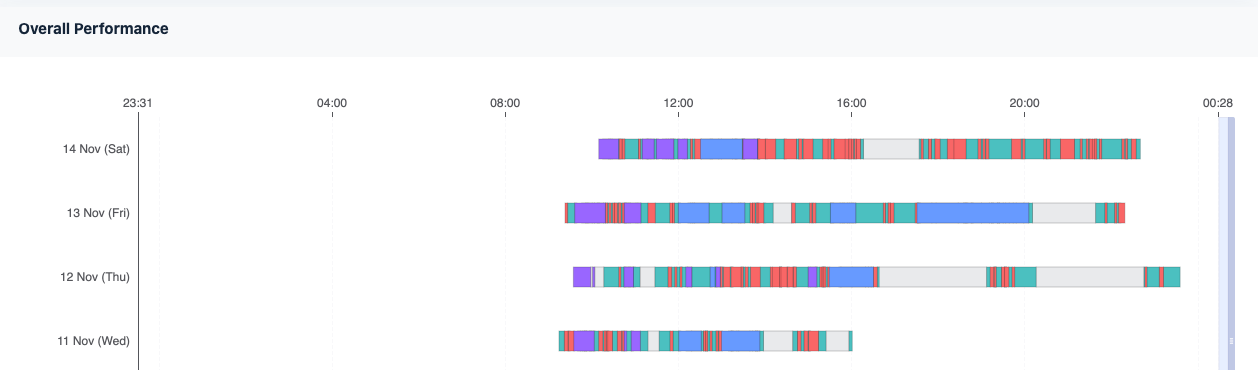
Keystrokes, mouse clicks and scrolls per interval show focused work versus a screen left open.
Idle Time Tracking
Breaks and inactive stretches are logged on their own, so active hours stay honest.
Daily Work Summary
One record per person per day, rolling up every application used, for quick manager review.
Screenshot Log
Optional periodic screenshots for audit, with automatic clean-up after the days you choose.
Alerts and Follow-ups
Email alerts on time violations, and lead or opportunity follow-ups created as trackable Tasks.
What does each person see?
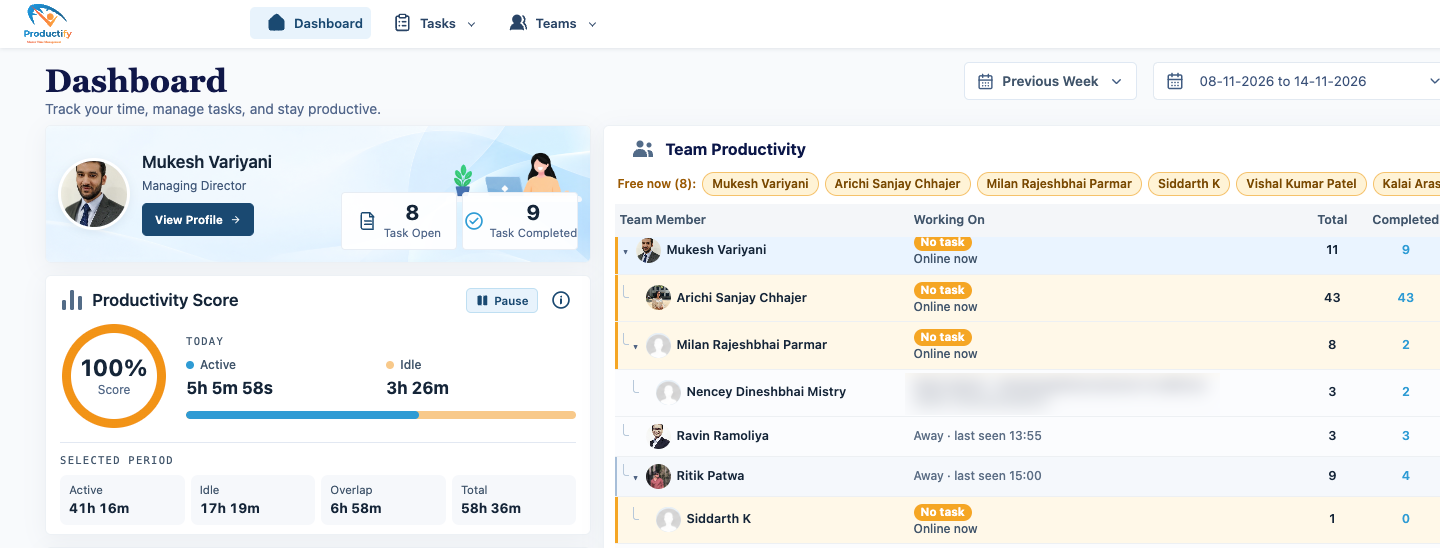
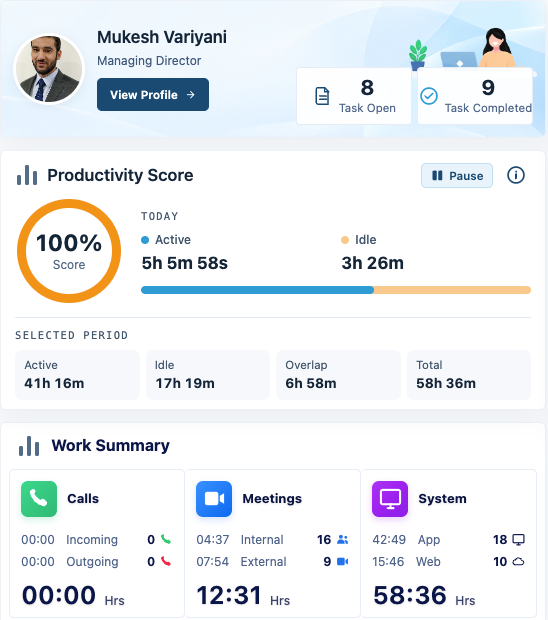
Each person's dashboard shows open and completed tasks, a productivity score with today's active and idle time, and the period's active, idle, overlap and total hours.
The work summary splits the day into calls, internal and external meetings, and system time on apps and the web.
How is this different from a standalone time tracker?
Both capture time automatically. The difference is where the data lands and what it is linked to.
| Productify on ERPNext | Standalone time tracker | |
|---|---|---|
| Where the data lives | On your own ERPNext site, as ERPNext records | In the tracker vendor's app |
| Linked to | Task, Project or Issue in ERPNext | Its own projects, kept in step by hand or by an integration |
| Timesheets | ERPNext Timesheets built from tracked activity | Exported, then entered or imported into the ERP |
| Who sees what | Standard ERPNext roles and permissions | A separate set of users and rights |
| Project costing | Effort is already against the project in ERPNext | Needs an export before it means anything |
Is it time tracking with screenshots?
Only if you want it. Screenshot logs are optional, and both screenshots and application logs are cleared automatically after the number of days you set. Screenshots can also be blurred, if you only need to see that work was happening.
Each screenshot carries the active app and the Task, Project or Issue, so an audit trail sits next to the work it belongs to.
Not another tool. Part of your ERP.
Most trackers sit outside the ERP and need exports to mean anything. Productify writes straight into the records you already run the business on.
Linked to work, not just time.
Sessions carry the Task, Project or Issue reference.
Your roles and permissions.
Standard Frappe access rules decide who sees what.
Meeting aware.
Tracking pauses for a set duration during meetings.
Your working hours.
Separate active and total hours for weekdays and Saturdays.
You set the rules, not the software.
One settings page controls what is kept, for how long, and what counts as a full day.
| Setting | What it controls |
|---|---|
| Data retention | Separate limits for screenshots and app logs. |
| Active hours | Daily targets, with a Saturday option. |
| Meeting pause | Stop duration so calls are not marked idle. |
| Task or ToDo | Choose how lead follow-ups are created. |
| Time violation alerts | An email when a day falls short of the hours you set. |
One source of truth, four kinds of answers.
Real cost per project
Founders: see effort against each project and client, not an estimate.
Early warning
Project managers: spot a task eating hours before it blows the budget.
Fair appraisals
HR: reviews backed by consistent activity data, for every person.
Follow-ups that happen
Sales heads: lead and opportunity follow-ups become Tasks you can check.
How does a manager see the whole team?
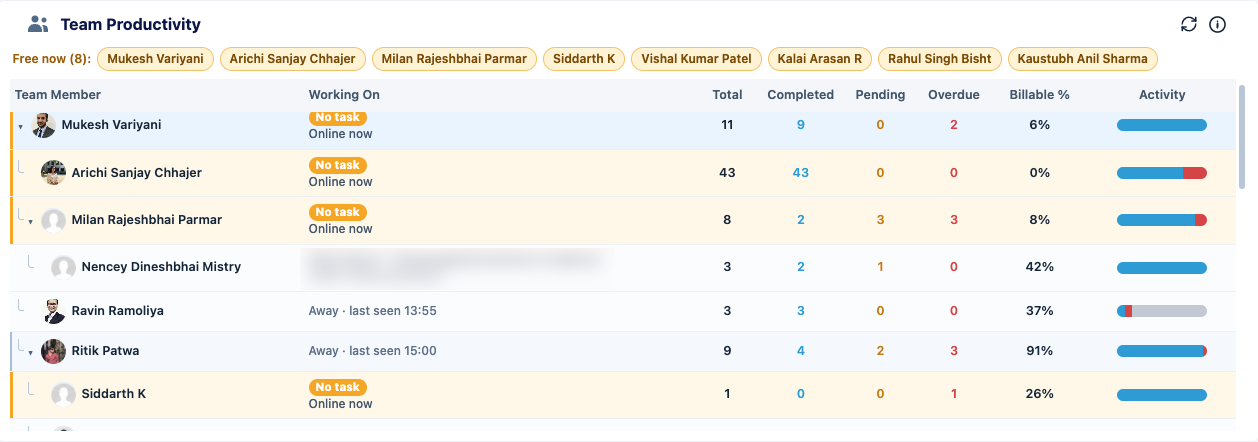
Team Productivity lists who is online, what each person is working on, their completed, pending and overdue tasks, billable share and an activity bar.
- ERPNext Projects and Tasks. Effort lands on the project it belongs to.
- ERPNext Support. Time on each Issue is visible, not guessed.
- ERPNext CRM. Lead and opportunity follow-ups become checkable work.
- ERPNext HR. Activity sits beside the Employee record HR already uses.
What do clients say about working with FinByz?
“We've had an excellent experience working with this software service provider. Their innovative approach to solving complex technical challenges has significantly improved our product. The addition of a dedicated developer to our team ensured seamless communication and consistent progress.”
“I personally think they go far and beyond in their delivery and commitments. As well as insuring that their clients are happy and well informed with there needs.”
“Great and professional software solutions, with a team very focused on client satisfaction.”
Stop guessing. Start seeing.
We run Productify on our own ERP every day. Book a walkthrough and see how it would look on yours.
As an ERPNext and Frappe implementation partner, our team installs, configures and trains your users as part of the rollout. FinByz Tech has worked on 200+ projects in 15+ countries. New to ERPNext? Start with ERPNext implementation, or see ERPNext HR and ERPNext CRM.
Ahmedabad, India
Head office and delivery centre. FinByz Tech Pvt Ltd, 504-Addor Ambition, Nr. Navrang Circle, Navrangpura, Ahmedabad, Gujarat 380009.
Dubai, UAE
UAE office. Finbyz Tech FZE, DWTC free zone, Dubai.