ERPNext Performance Optimization for Speed & Efficiency
Is ERPNext slow? FinByz Tech finds out why before changing anything: we measure the slow screens, read the database and Frappe logs, review your custom code, then fix the real causes and measure again. For systems we built and systems built by others.
What is ERPNext performance optimization?
ERPNext performance optimization is finding and fixing what makes an ERPNext system slow.
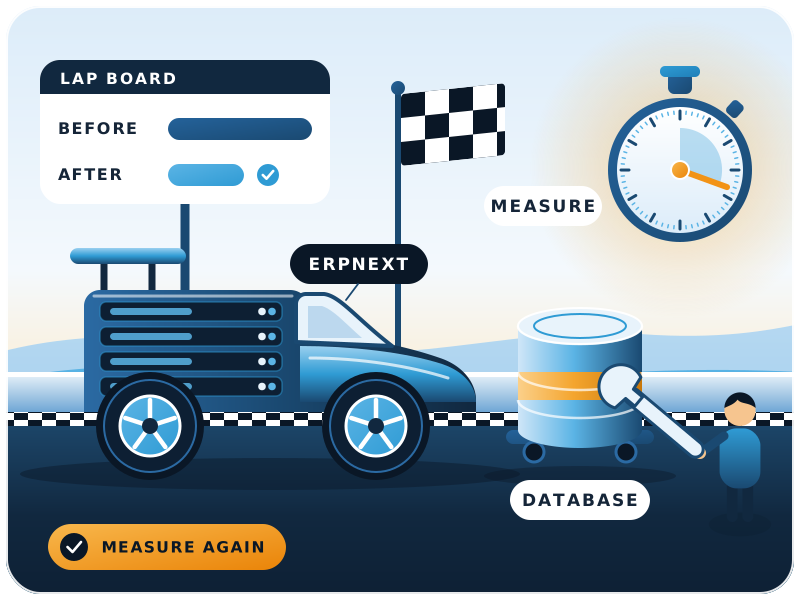
The cause is usually in the database, custom code, background jobs, reports or the server. FinByz Tech measures first, fixes the causes in order of gain, and times the same screens again so you can see the difference.
ERPNext is quick on a fresh system. It slows down as data grows, custom code piles up and nobody looks after the server. Adding hardware sometimes hides the problem for a while; it rarely removes it.
Fixes start from facts: which screen, how slow, and which query or script is behind it.
Which signs mean ERPNext needs tuning?
Slow saves, reports that time out, slow lists, queued jobs and a struggling server at month-end.
- Saving or submitting an invoice or order takes many seconds.
- Reports time out or only run for short date ranges.
- List views and search are slow to load.
- Background jobs pile up; emails and reports go out late.
- Month-end runs grind the system to a halt for everyone.
- The server sits at high CPU or memory, or starts swapping.
Why is ERPNext slow?
Slowness usually comes from six places: the database, custom code, background jobs, reports, data growth and the server. Often it is more than one.
Database
Missing indexes on fields used in filters, very large tables, and database memory that is too small for the data.
Custom code
Queries inside loops, heavy hooks on every save, and client scripts that load far more data than the screen needs.
Background jobs
Too few workers, long jobs on the default queue, or a stopped scheduler, so work queues up behind it.
Reports
Query reports over years of ledger entries, unindexed filters, and dashboards that recalculate on every open.
Data and log growth
Error logs, version history, email queues and old files that nobody cleans up, slowing every backup and query.
Server and hosting
Too little memory, slow disks, the wrong number of web workers, or the database and app fighting for one small machine.
How do you find what makes ERPNext slow?
FinByz Tech times the slow screens, reads the slow query log and the Recorder, checks the job queues, then reviews custom code, in that order, before any change is made.
- 1Measure a baselineWe time the screens, saves and reports your users complain about, so there is a number to beat.
- 2Read the slow query logThe database's slow query log shows which queries take longest and how often they run.
- 3Record the slow screensFrappe's built-in Recorder captures every query and its stack trace behind one slow action.
- 4Check jobs and workersbench doctor and the job queues show stuck schedulers, missing workers and long jobs.
- 5Review custom appsHooks, scripts and reports in your custom apps are read for the patterns that slow ERPNext.
- 6Rank the fixesYou get a short report: each cause, the fix, the effort and the expected gain, in order.
Which Frappe tools are used?
The slow query log, the Recorder and bench doctor are described in Frappe's own performance and monitoring documentation.
Why choose FinByz for ERPNext performance tuning?
Developers and server engineers who have worked on ERPNext since 2016, in one in-house team.
Silver partner, listed on frappe.io
Listed on frappe.io at PMM level 4. Framework issues go to Frappe directly.
Measured, not guessed
Every fix starts from a timing and a query log, and ends with the same timing taken again.
Code and server in one team
Developers and server engineers sit together, so a slow screen is fixed wherever the cause is.
Tested on a copy first
Changes are tried on a staging copy of your system before they touch your live data.
Every hour visible
You get your own Productify access: tasks, time logs and a short report of what changed.
No lock-in
Your custom apps stay open source under GPL v3, in your repository, with code access from day one.
What do we fix to speed up ERPNext?
Whatever the diagnosis points to, from one missing index to a rewrite of a slow custom app.
Queries and Indexes
Indexes added where filters need them, heavy queries rewritten, and repeated lookups cached.
Faster Custom Code
Slow hooks, loops and client scripts rewritten in your custom app, never in ERPNext's own code.
Custom ERPNext developmentReports and Dashboards
Reports given sensible filters, summary tables or background preparation so they open quickly.
Job Queues and Workers
Long tasks moved to the right queues, workers sized, and the scheduler checked.
Data and Log Clean-Up
Log retention set in Log Settings, old logs and files cleared, large tables archived where safe.
Server and Database Settings
Memory, database buffer, swap and web workers sized for your users and data.
Server or code: where is the problem?
The symptom usually points to the layer. This is where we look first.
| Symptom | Likely cause | First check |
|---|---|---|
| One form is slow to save | Custom hook or validation | Recorder on that save |
| Every page is slow | Server memory or web workers | Server load and worker count |
| One report times out | Query over large tables | Slow query log and indexes |
| Emails and jobs run late | Workers, queues or scheduler | bench doctor and job queues |
| Slower every month | Data and log growth | Table sizes and log retention |
| Slow only at month-end | Heavy batch jobs at the same time | Job timing and queues |
Can tuning be done without risking live data?
Yes. Changes are tried on a staging copy of your system first.
We copy your site with its data and apps, apply and time each change there, then move it to the live system in an agreed quiet window, with a checked backup taken just before.
- Read-only diagnosis. Logs and timings are read without changing anything.
- Staging copy. Indexes, code and settings are tested on a copy first.
- Planned window. Live changes go in outside busy hours.
- Way back. A backup before each change, so it can be undone.
Can you tune ERPNext hosted on Frappe Cloud?
Yes. Code, indexes, reports and background jobs are ours to fix there. Server and database settings belong to Frappe, and we raise them with Frappe's support.
How do you measure before and after?
With the same timings, on the same screens, taken before the first change and after the last.
- Load time of the slowest forms and lists.
- Save and submit time of key documents.
- Run time of the reports people use most.
- Length of the background job queues.
- Count and duration of slow queries.
- Server CPU, memory and swap at peak hours.
How much faster will ERPNext get?
Nobody can say before the first timings. You get a before and after for each screen and report we work on.
What did tuning do for one ERPNext client?
At SMOOR Chocolates (ERPNext v13, customised by another partner), saving a 30-35 line purchase order fell from about 15 minutes to under 30 seconds after FinByz Tech's one-month optimisation.
Case study: ERPNext 30x faster at SMOOR Chocolates
Saving a purchase order with 30-35 lines took about 15 minutes. After a one-month optimisation by FinByz, it takes under 30 seconds.
How do you stop ERPNext slowing down again?
With a few regular checks. Most slowdowns grow quietly over months.
Every week
Jobs and errors
Scheduler, failed jobs and the error log checked, so a stuck queue is found in days, not months.Every month
Timings
The same screens and reports timed again and compared with last month.Every quarter
Data growth
Large tables, logs and files reviewed; retention adjusted before they slow things down.Every upgrade
Re-test
Custom apps re-timed on staging after each ERPNext update, before going live.
Can the checks run every month?
Yes. FinByz Tech runs them as part of an ERPNext AMC. Moving to version 16? Read our ERPNext v16 performance guide.
How is ERPNext performance tuning billed?
On time and material, from a monthly plan of hours. You see every hour, and the plan can stop after the work is done.
- Diagnosis first. A short first piece of work that ends with the ranked fix list.
- Fixes in order of gain. You choose how far down the list to go.
- Every hour visible. Tasks and time logs in your own Productify access.
- One month at a time. Unused hours carry forward one month; stop with 30 days' notice.
What do clients say about working with FinByz?
“We've had an excellent experience working with this software service provider. Their innovative approach to solving complex technical challenges has significantly improved our product. The addition of a dedicated developer to our team ensured seamless communication and consistent progress.”
“I personally think they go far and beyond in their delivery and commitments. As well as insuring that their clients are happy and well informed with there needs.”
“Great and professional software solutions, with a team very focused on client satisfaction.”
What happens after you contact us?
Tell us which screens are slow and how you host ERPNext. A consultant asks for read access, takes the first timings and shares what the logs show. Then you get a proposal for the fixes, and you decide from there.
FinByz Tech has worked on 200+ projects. See all ERPNext services or our ERPNext case studies.
Ahmedabad, India
Head office and delivery centre. FinByz Tech Pvt Ltd, 504-Addor Ambition, Nr. Navrang Circle, Navrangpura, Ahmedabad, Gujarat 380009.
Dubai, UAE
UAE office. Finbyz Tech FZE, DWTC free zone, Dubai.