OpenClaw vs Claude Code: Which AI Agent Fits Your Work?
OpenClaw (formerly Moltbot and Clawdbot) is an open-source personal agent you message from WhatsApp, Telegram or Slack. Claude Code is Anthropic's coding agent for your codebase. Here's what each does in late 2026, where they now overlap, and which one to pick.

- Moltbot renamed OpenClaw
- 30 Jan 2026
- OpenClaw licence: free, open source
- MIT
- Chat apps OpenClaw connects to
- 20+
- Places Claude Code runs: terminal, IDE, desktop, web
- 4+
The short answer
OpenClaw vs Claude Code in short
In short
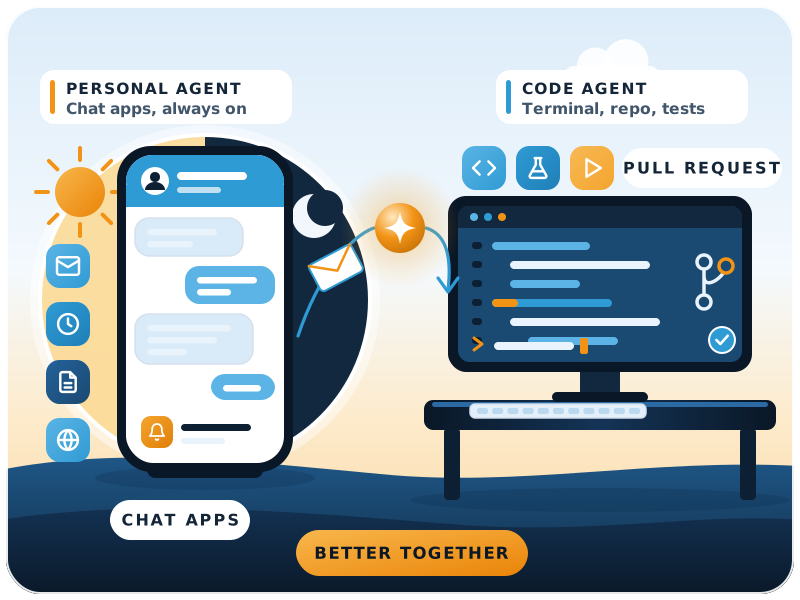
They do different jobs. OpenClaw is an open-source personal assistant that runs on your own computer or server. You message it from the chat apps you already use, and it acts on your inbox, calendar, files and browser. Claude Code is Anthropic's coding agent. It reads a codebase, edits files, runs commands and opens pull requests. Pick Claude Code to build and fix software, OpenClaw for always-on personal or office automation. Many teams use both.
This page replaces our February 2026 "Moltbot vs Claude Code" comparison. Moltbot is the same project, now called OpenClaw. Both tools have changed a lot since then, and the gap between them is smaller than it was.
- Writing or fixing software: Claude Code
- Inbox, calendar and reminders from your phone: OpenClaw
- Code reviews and pull requests: Claude Code
- Always-on alerts and admin for owners: OpenClaw
OpenClaw can run on Claude models, and many people use it that way. So the choice is rarely "Claude or not". It's about the job: a chat-driven assistant that works around the clock, or an agent that works inside your code.
Same project, new name
What happened to Moltbot?
Moltbot didn't shut down. It was renamed twice in four weeks and is now OpenClaw, with the same code and the same lobster theme. The project was started by Austrian developer Peter Steinberger.
24 Nov 2025
First published as Warelay
A personal assistant you could message on WhatsApp. Renamed CLAWDIS on 3 December.2 Jan 2026
Renamed Clawdbot
The name came from Clawd, the assistant Steinberger had built, itself named after Anthropic's Claude.27 Jan 2026
Renamed Moltbot
After trademark complaints from Anthropic.30 Jan 2026
Renamed OpenClaw
Three days later. The name it has kept since.14 Feb 2026
Creator joins OpenAI
Steinberger announced he was joining OpenAI. A non-profit OpenClaw Foundation was set up to look after the project.30 Aug 2026
OpenClaw 2.0
Faster install, a redesigned interface, browser updates and shared cloud sessions.
If you followed our earlier Clawdbot to Moltbot rebrand story, this is how it ended. Old guides that say Clawdbot or Moltbot still mostly apply, but install commands and settings now use the openclaw name.
Late 2026
What each tool does today
OpenClaw: a personal agent you message
Runs on your own machine through a local Gateway, on macOS, Linux, Windows (or WSL2). You talk to it on WhatsApp, Telegram, Slack, Discord, Teams, Signal, iMessage, Google Chat and more. Native apps exist for desktop and phone.
It works with hosted or local models, keeps its memory and credentials on your hardware, and can be extended with skills and plugins shared on ClawHub. Licence: MIT.
Claude Code: an agent for your codebase
Reads your whole project, edits files across it, runs commands and tests, and works with git to make commits and pull requests. It runs in the terminal, VS Code, JetBrains IDEs, a desktop app and the browser.
It can be shaped with a CLAUDE.md file, skills, hooks and MCP connections to tools such as Jira, Google Drive and Slack. Most of it needs a paid Claude plan or an Anthropic Console account.
Put simply, OpenClaw is a generalist that lives in your chat apps. Claude Code is a specialist that lives in your code. If you're weighing other open-source agents too, see our open-source AI agent frameworks comparison.
Comparison table
OpenClaw vs Claude Code side by side
| OpenClaw | Claude Code | |
|---|---|---|
| Main job | Personal and office automation | Building, fixing and reviewing software |
| How you use it | Chat apps (WhatsApp, Telegram, Slack ...) and native apps | Terminal, IDE, desktop app, browser |
| Where it runs | Your computer or server, always on | Your machine, or Anthropic's cloud for web sessions |
| Models | Swappable: Claude, OpenAI models or local models | Claude models |
| Memory | Stored on your own hardware | CLAUDE.md plus auto memory per project |
| Scheduled work | Yes, runs around the clock | Yes: cloud and desktop scheduled tasks |
| Extend it with | Skills and plugins (ClawHub), plugin SDK | Skills, hooks, MCP servers, Agent SDK |
| Safety defaults | Pairs unknown senders; tools run on the host unless you set up a sandbox | Asks before editing files or running commands unless you allow them |
| Cost | Free software; you pay for the model and the machine | Paid Claude plan or pay-as-you-go API usage |
| Setup effort | Medium: installer, then onboarding, channels and keys | Low: one install command or an IDE extension |
| Best for | Owners, assistants, ops teams comfortable running a server | Developers and technical teams |
Costs depend on your model provider and how much the agent does, so test with a spending limit before you rely on either one.
What changed in 2026
Where OpenClaw and Claude Code now overlap
In February the line was clear: Claude Code was for code at your desk, Moltbot was for everything else, from your phone. Since then each has borrowed from the other.
Claude Code runs on a schedule
Claude Code from your phone and chat
Claude Code in Slack
OpenClaw is easier to install
OpenClaw pairs strangers first
OpenClaw has a foundation
The difference that remains: Claude Code is built around a codebase and asks before it acts. OpenClaw is built around your accounts and chats, and is meant to act on its own.
Before you connect anything
Security: what to check before you connect either one
An agent with access to your email, files or servers is as risky as the access you give it. OpenClaw's own README says to treat incoming messages as untrusted input and to read its security and sandboxing guides before connecting other people or exposing the Gateway to the internet.
What has gone wrong so far
- Cisco's AI security team found a third-party OpenClaw skill that sent data out and injected instructions without the user knowing. Skills were not well vetted.
- In March 2026 Chinese authorities restricted state-run firms and government offices from running OpenClaw on office computers.
- A review of OpenClaw 2.0 in The Register noted that the sandbox is not on by default and stored secrets are not encrypted at rest.
Our checklist for both tools
- Give the agent its own accounts and API keys, never your personal ones.
- Start read-only and add write access one tool at a time.
- Turn on OpenClaw's sandbox and keep the Gateway off the public internet.
- Install only skills and plugins you have read or trust.
- Keep Claude Code's approval prompts on for commands that change data.
- Set spending limits with your model provider.
- Keep keys in a secrets store or environment variables, never in chat.
- Review logs weekly for the first month.
Decision guide
Which one should you choose?
Choose Claude Code if
You or your team write software, and you want an agent that works inside the codebase with approvals, git and CI. It's also the quicker of the two to set up safely.
Choose OpenClaw if
You want an assistant you can message from your phone that handles email, calendar, research and reminders around the clock, and someone on the team can run and secure a small server.
Use both if
Developers build and maintain your systems with Claude Code, while OpenClaw handles day-to-day admin and alerts for owners and operations staff.
FinByz sets up and secures OpenClaw personal assistants for businesses, and connects AI agents to ERPNext. For the Claude side, our guide to Claude for small business covers plans and setup.
Sources
- OpenClaw README (GitHub), install, channels, security defaults, licence
- Claude Code overview (Anthropic docs), surfaces, features, scheduled tasks, Channels
- OpenClaw (Wikipedia), name history, foundation, security incidents, 2.0 release
- CNBC, 2 Feb 2026, From Clawdbot to Moltbot to OpenClaw